
Intelligently designed production cycle with software from ISBE
Consistently digital tool data from sales to production
TD Sketcher is a software for designing and planning standard and special tools in 2D and 3D. You can use the integrated wizard to describe your tools quickly and easily. From this data record, you not only generate appealing quotation and release drawings, but also automatically generate the digital twins for your production and customers. You can retrieve the necessary and latest formats at any time.
From the offern in sales to production and quality control – TD Sketcher accompanies your entire digital process chain. Tool manufacturers can use TD Sketcher to intelligently network connected grinding and measuring machines and prepare the tool data once created in TD Sketcher in the commonly used formats for the various work areas.

The advantages at a glance

1. Intuitive operation – no CAD required
TD Sketcher is specifically tailored to the requirements of cutting tools – easy to use, quick to learn, and ready for anyone who designs, documents, sells, or manufactures tools.

2. Quotations in the shortest time – with drawing, 3D model, and cost calculation
A fast, complete quotation increases the probability of closing – especially for special tools. Create professional drawings, 3D models, as well as automatic grinding time and cost calculations directly in TD Sketcher – as a basis for your quotation preparation, without detours through other departments or systems.
Being faster than the competition is a clear advantage.

3. Data exports according to industry standards – without additional CAD software
Export standard-compliant DXF and STEP files according to DIN SPEC 69874, DIN 4003, and ISO 13399, as well as XML according to DIN 4000 – directly from TD Sketcher, without detours through separate CAD systems. This way, you provide your customers with exactly the data they require for use in tool management and CAD/CAM systems.

4. Automated drawing and documentation generation
Use drawing templates that automatically adjust the layout, predefined tables, custom tool types, and stored parameters (e.g. coolant holes, coatings). This way, consistent, reproducible documentation is created with minimal effort – including customer-specific layouts at the push of a button.

5. Scalability for single tools and large data volumes
Whether targeted search for single tools with TD Selector or automated batch processing with TD Converter: TD Sketcher scales with your requirements. Integration with your own data formats is also possible without difficulty.

6. Seamless data transfer to grinding and measuring machines
With GDX® and XML, you transfer complete tool and measurement data to compatible machine environments – error-free, without manual input. At the same time, you ensure repeatable results, independent of the operator or the machine.
Flexibly expandable
Thanks to the numerous additional options available, the TD Sketcher can be flexibly and individually adapted to your requirements, making it the indispensable linchpin of your digital production.
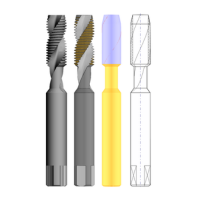
Option 3D
3D simulation and standard-compliant exports (DIN 4003, ISO 13399, DIN SPEC 69874)With the option 3D, you can visualize your tools realistically to verify geometry and feasibility. At the same time, simplified 3D and 2D models can be exported as STEP and DXF files according to DIN 4003, ISO 13399, and DIN SPEC 69874 – for further use in CAM and tool management systems.

Option TIME
Design tools, calculate time and costs, create quotationTIME automatically calculates tool paths, machining times, and costs – based on geometry and defined feed profiles. This way, well-founded quotations are created directly during design.

Option TD Selector
Find tools quickly – even in large data setsThe TD Selector enables fast searching and reuse of tools – even with extensive data sets. By filtering specifically by geometry parameters, you keep an overview and efficiently create new tools based on proven designs.

Option DIAMOND
Precise design of PCD toolsWith the Option Diamond for TD Sketcher, special PCD-tipped cutting tools can be defined and drawn. The properties of the tool are described via an easy-to-use user interface.
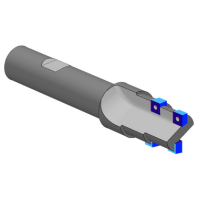
Option INSERT
Precise design of tools with ISO insertsThe Option Insert for TD Sketcher was specially developed for cutting tools with ISO inserts. With the software, entire indexable insert tools can be designed in just a few minutes by simply entering the outer contour and ISO indexable inserts.

Option GDX®
Complete data consistency from drawing to machineWith the GDX®box, TD Sketcher becomes an end-to-end solution for digital tool manufacturing. Drawings, geometry, measurement instructions, and machine parameters are created centrally and automatically transferred to compatible grinding or measuring machines – in GDX® or XML format, standard-compliant and without media disruption.

Option TD Sketcher CAM
Generate 3D base body models for manufacturing with one click without CADWith the Option CAM for TD Sketcher, 3D models with flutes and insert seats can be derived directly from TD Sketcher with the Option DIAMOND. The 3D model is generated as a surface model (STEP). Elaborate designs in CAD are no longer necessary.
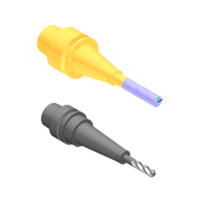
Option TD Sketcher Assembly
Create complete tools as assemblies and manage them efficientlyWith the Option Assembly for TD Sketcher, complete tools can be assembled and visualized from already defined individual tools. The complete tools can later be exported as DIN 4003 and ISO 13399 STEP models for CAM programming.

Option TD Converter
Standardized tool data according to DIN/ISO – automated from existing sourcesWith TD Converter, you can generate complete 2D and 3D data sets from existing catalog data in the shortest time according to DIN 4000, DIN 4003, and ISO 13399 – ideal for providing standardized tool data to your customers. Even tens of thousands of tools can be processed and exported automatically.